Marketing
How to Use LinkedIn to Get Customers: A 7-Step Outbound System (With Our Own Data)
Nikhil Adiga · · 5 min read
On this page
- Our research: LinkedIn is the most complete map of your buyers
- What does LinkedIn outreach actually return?
- Step 1: Fix your profile so it sells for you
- Step 2: Build a tight list, not a big one
- Step 3: Find the trigger before you write a word
- Step 4: Engage before you pitch
- Step 5: Write the message that earns a reply
- Step 6: Publish content that does the prospecting for you
- Step 7: Follow up on a schedule, then switch channels
- Which tools help you use LinkedIn to get customers?
- FAQ
- Turn LinkedIn into a customer engine
Nine in ten B2B buyers we target can be found on LinkedIn. Most companies still use it to post and pray. If you want to know how to use LinkedIn to get customers, stop treating it as a content feed and run it as a pipeline: a defined list, a trigger, a message worth answering, and a follow-up that never slips.
This guide gives you that system in seven steps, the reply-rate benchmarks behind each one, original data from our own prospect database, and the tools that execute it.
Our research: LinkedIn is the most complete map of your buyers
We audited the 1,364 B2B prospect records in our own 10ex workspace — SaaS and tech companies, seed to Series B. 1,230 of them (90%) had a LinkedIn profile on file. Among founders, coverage was 89 out of 89 — 100%.
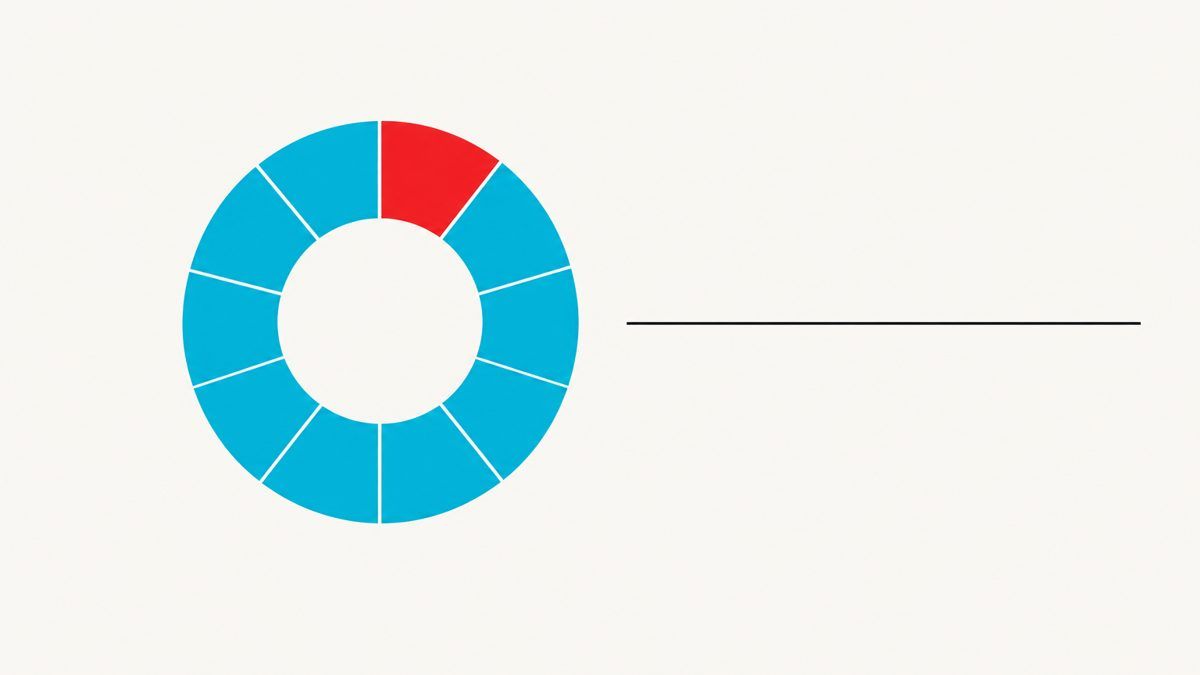
Nine in ten: 1,230 of 1,364 prospects in our database carry a LinkedIn profile; every one of 89 founders does.
Contrast that with email. Only 25 of those same records had passed email verification at the time of the audit. Email addresses go stale, bounce, and need cross-checking. A LinkedIn profile is the identity layer your buyers maintain themselves — job title, company, tenure, activity. That makes it the best place to start, not just one channel among many.
What does LinkedIn outreach actually return?
Before building the system, set honest expectations. Across large 2025 outreach benchmarks:
- Connection requests are accepted 26–29% of the time. Adding a note barely moves acceptance (26.42% with one vs 26.37% without).
- Replies after acceptance run around 10.4%.
- Cold InMail averages about 6.4% response on broad campaigns.
- Personalized messages pull 9.36% replies vs 5.44% for generic ones — a 72% lift.
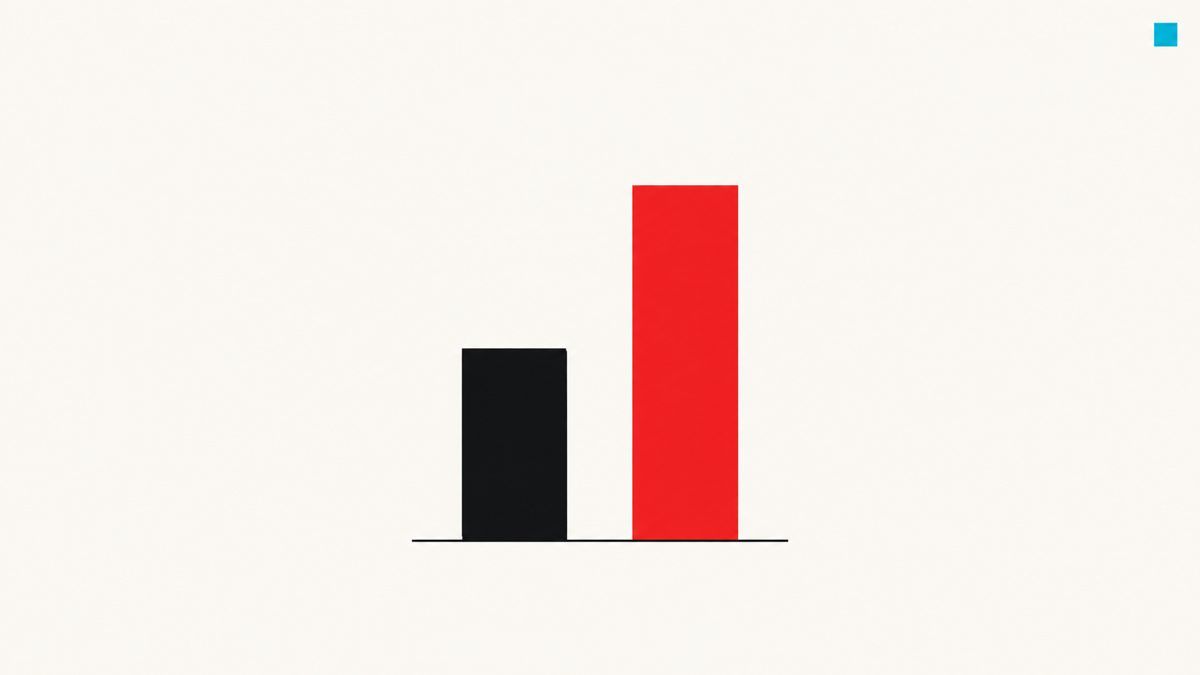
Personalized LinkedIn messages earn 9.36% replies; generic ones earn 5.44%.
The lesson: personalization does not get you accepted. It gets you answered. So spend effort on the second message, not the connection note.
Step 1: Fix your profile so it sells for you
Every prospect you message clicks your profile before replying. Rewrite your headline as an outcome for a named buyer: "Helping seed-stage SaaS founders book 20 demos a month without SDRs" beats "CEO at Acme." Put one proof point and one clear next step in the About section. Pin a featured post that shows your work.
Step 2: Build a tight list, not a big one
Define your ideal customer in filters you can actually apply: industry, headcount, funding stage, title, geography. Then cut it down to accounts showing a reason to buy now. A list of 300 right-fit, in-market accounts beats 5,000 loose matches every time — and protects your account from the weekly invitation limit.
Step 3: Find the trigger before you write a word
The best LinkedIn messages reference something that just happened. Watch for:
- Hiring signals — a company posting an SDR or BDR role is telling you pipeline is a problem.
- Job changes — new VPs buy in their first 90 days.
- Funding announcements — fresh capital means growth targets.
- Post engagement — anyone commenting on a topic you solve is self-identifying.
No trigger, no message. That rule alone lifts reply rates more than any copy trick.
Step 4: Engage before you pitch
Comment on a prospect's post two or three days before you connect. A thoughtful comment puts your name in front of them with zero ask. When the connection request lands, you are not a stranger.
Step 5: Write the message that earns a reply
Keep the connection request blank or one line — the data says the note barely matters. Save the work for the first message after acceptance:
- Trigger: "Saw you're hiring two SDRs."
- Problem: "Most teams at your stage spend 3–4 months ramping each one."
- Diagnostic question: "Is the goal more meetings, or more coverage of the same list?"
Under 60 words. No calendar link in message one. Ask a question they can answer in a sentence.
Step 6: Publish content that does the prospecting for you
Outbound opens doors; content keeps them open. Native document (carousel) posts get 2.5–4× the reach of text posts and engagement around 6.6%, versus roughly 1.8% for text-only. Turn your best frameworks, checklists and teardowns into documents. Open with a question — question-led carousels draw 2.4× more comments. Then treat every commenter as a warm lead and move them into Step 5.
Step 7: Follow up on a schedule, then switch channels
Most replies come after the second or third touch. Run a simple cadence: message on day 0, a value-add follow-up on day 4, a short bump on day 10. No reply after three touches? Move to verified email with the same trigger. Multi-channel beats single-channel because your buyer does not live in one inbox.
Which tools help you use LinkedIn to get customers?
| Job | Tool | What it does |
|---|---|---|
| Prospect search & lead lists | LinkedIn Sales Navigator | Advanced filters, saved lead lists, job-change and account alerts |
| Paid reach & retargeting | LinkedIn Campaign Manager + Insight Tag | Target by title and company; retarget site visitors with ads |
| Inbound capture | LinkedIn Lead Gen Forms | Pre-filled forms that convert ad clicks into contacts |
| Self-check | Social Selling Index (SSI) | Free activity score — useful as a diagnostic, not a revenue predictor |
| Native publishing | LinkedIn document posts & newsletters | Highest-reach organic formats for frameworks and research |
| End-to-end execution | 10ex | Autonomous agents build the list, watch signals, enrich and cross-check contact data, write trigger-based LinkedIn and email sequences, and book the meeting |
Native LinkedIn tools find and reach people. They do not do the work in between — spotting the trigger, writing the message, following up on day 4, switching to email on day 10. That gap is where most LinkedIn programs die, and it is exactly what 10ex agents execute.
FAQ
How many LinkedIn connection requests can I send per week?
LinkedIn caps invitations at roughly 100–200 per week depending on account standing. Low acceptance rates can get you restricted, which is another reason to send fewer, better-targeted requests.
Is InMail or a connection request better for getting customers?
For broad cold outreach, a connection request followed by a message usually wins: replies after acceptance run around 10.4% vs about 6.4% for cold InMail. Use InMail for senior buyers who rarely accept strangers.
How long does LinkedIn take to produce customers?
Outbound produces conversations in the first two weeks. Content compounds over two to three months. Run both from day one.
Do I need LinkedIn Premium or Sales Navigator?
Not to start. Free LinkedIn works for under 50 targeted accounts. Past that, Sales Navigator's filters and alerts pay for themselves.
Turn LinkedIn into a customer engine
How to use LinkedIn to get customers comes down to one shift: stop broadcasting and start executing. Ninety percent of your buyers are already mapped there. Build the list, find the trigger, write a message worth answering, and never miss a follow-up. Do it by hand for 50 accounts — or let 10ex agents run it for 5,000.