Marketing
How to Build a B2B Lead List That Books Meetings (7 Steps + Template)
Nikhil Adiga · · 7 min read

On this page
- Why do most B2B lead lists fail?
- Step 1: How do you define the ICP for a lead list?
- Step 2: Where do you find the right accounts?
- Step 3: Why does every row need a trigger?
- Step 4: Which fields should a B2B lead list include?
- Step 5: How do you verify emails before sending?
- Step 6: How should you tier and size the list?
- Step 7: How often should you refresh a lead list?
- What do practitioners get wrong when building lead lists?
- FAQ
To build a B2B lead list that books meetings, write down disqualification rules before you open any database, attach a dated buying trigger to every row, verify each email against at least two sources, and cap the list at what you can work in 30 days. A B2B lead list is a short, fresh list of people who have a reason to talk to you this month. It is not a big export from a database.
This guide follows the process practitioners describe in forum threads, which hold most of the top results for this search. It adds the parts those threads usually skip: a fill-in field template, sourced benchmarks, and a refresh schedule.
Why do most B2B lead lists fail?
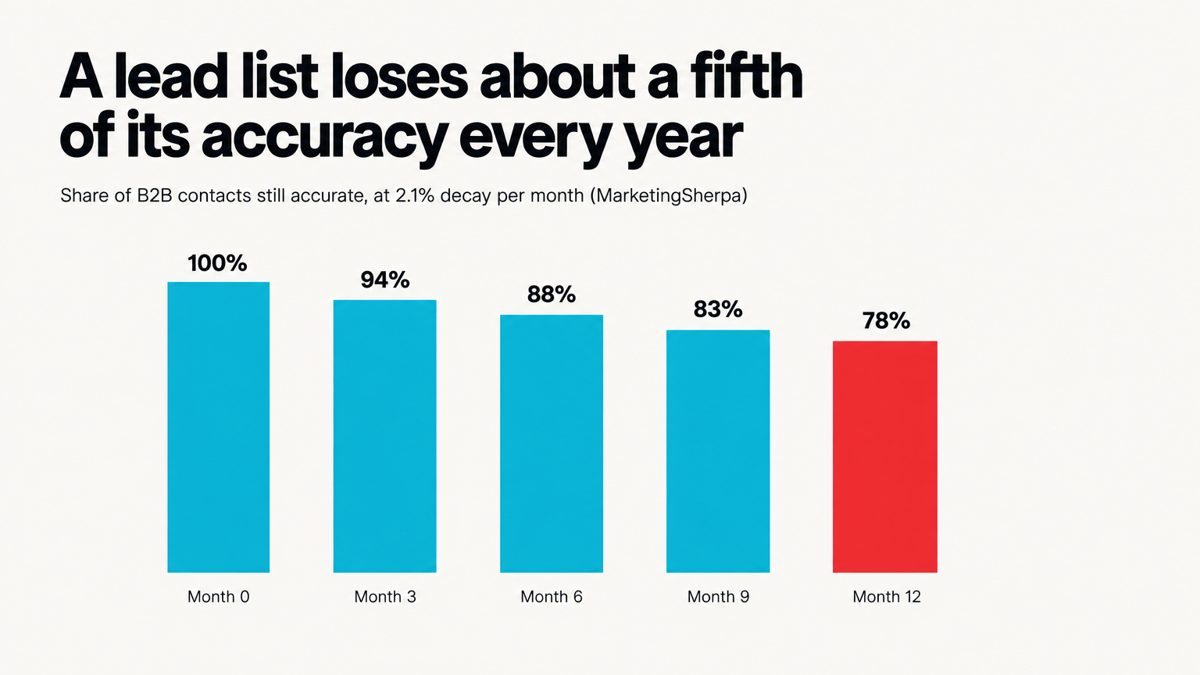
Most lead lists fail because they go stale and have no focus, not because they are too small. MarketingSherpa's research, cited by HubSpot and in 2026 analyses, puts B2B contact data decay at roughly 22.5% a year, or about 2.1% a month. If you build a list in January and send to it in December, about one row in five is wrong.
Focus matters even more. In its 2025 dataset of 7.53 million cold emails, Belkins reported an average reply rate of 0.45%. At that rate, a broad list of 2,000 contacts gets you about nine replies. Before you buy more contacts, make the list better.
Step 1: How do you define the ICP for a lead list?
Define the ICP as a set of filters, and start with the people you will exclude. "B2B SaaS, 10–200 employees" describes a market, not a list. Write rules that a script, or an intern, could apply without asking you:
- Firmographic in: B2B SaaS, Seed to Series B, 10–200 employees, sells to companies, has a pricing or demo page.
- Firmographic out: agencies, marketplaces, companies with more than 15 SDRs already, any company in an active deal with you.
- Persona in: the person who owns the problem and the budget, such as the founder below 30 people and the Head of Growth or VP Sales above that.
- Persona out: interns, "aspiring" titles, and anyone more than two levels below the owner.
Look at your last 10 closed-won deals and write down the three things they had in common. Those three things are your filters.
Step 2: Where do you find the right accounts?
Find accounts where buyers leave public evidence of the problem, not only in a contact database. The places that reliably turn up companies at the right moment:
- Job boards: a posted SDR, BDR or growth role means pipeline is a priority right now.
- Funding announcements from the last 90 days.
- Community threads where people ask for help with the problem you solve.
- Product changelogs and pricing-page changes, which signal a new motion.
- Your own site visitors and content engagers.
Databases are good for filling in contact details. They are poor at telling you who needs you this month.
Step 3: Why does every row need a trigger?
Every row needs a dated reason to reach out, because the trigger is the first line of the email. If you cannot write "saw you posted a BDR role on Nov 3" for a row, that row is a cold guess. Make the trigger a required field and drop any row without one.
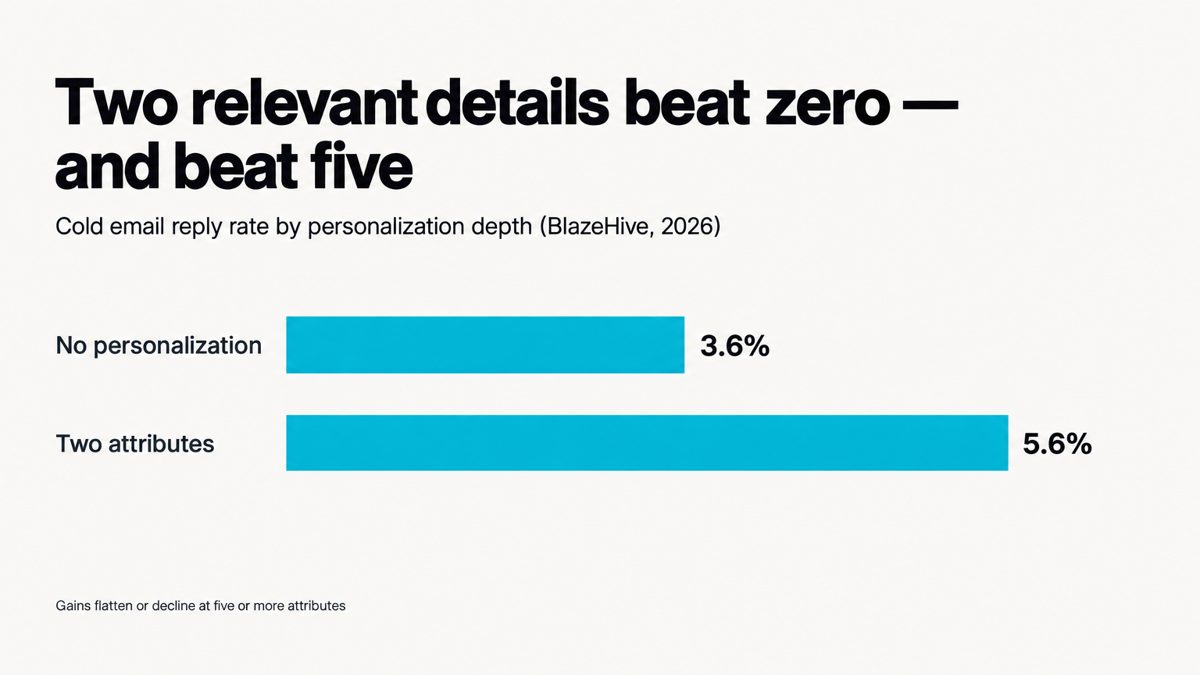
This also stops you from overdoing personalization. In a 2026 analysis, BlazeHive reported that reply rates rose from 3.6% with no personalization to 5.6% with two relevant attributes, then flattened or fell with five or more. Use one trigger and one role-specific line. That is enough.
Step 4: Which fields should a B2B lead list include?
A B2B lead list needs about a dozen fields: enough to qualify, personalize and route each row, and no more. Copy this template into your sheet or CRM:
| Field | Example | Required? | Why it matters |
|---|---|---|---|
| Company name + domain | acme.io | Yes | Dedupe key; checks the email domain |
| Employee range | 11–50 | Yes | ICP filter |
| Stage / last funding date | Seed, 2026-09 | Yes | Budget and urgency |
| Trigger + date | BDR job post, 2026-11-03 | Yes | Opening line; freshness |
| Trigger source URL | link | Yes | Proof you are not guessing |
| Contact name + title | Jane Doe, Head of Growth | Yes | Persona filter |
| Email + verification status | verified (2 sources) | Yes | Deliverability |
| LinkedIn URL | link | Yes | Second channel; identity check |
| Tier | A / B / C | Yes | How much effort per row |
| Personal line | "Saw the pricing page change" | Tier A only | Reply rate |
| Date added / last verified | 2026-11-20 | Yes | Refresh scheduling |
| Owner + status | agent / new | Yes | Stops double outreach |
Leave out fields nobody acts on, such as revenue estimates you never filter by, tech-stack lists with 40 entries, and office addresses.
Step 5: How do you verify emails before sending?
Check each email against at least two independent sources and only send to addresses both sources agree on. One provider's "valid" is a guess. Two agreeing sources is evidence. Send catch-all and "unknown" results to a small test batch, not the main send.
The stakes are concrete. Google's sender guidelines ask bulk senders to keep spam complaints below 0.1% and treat 0.3% as the ceiling where delivery penalties begin, according to 2026 summaries of the 2024 rules. Neither Google nor Yahoo publishes an official bounce-rate cutoff. Even so, a list full of dead addresses is the quickest way to make the people who do get your email see you as a spammer.
Step 6: How should you tier and size the list?
Size the list to what you can work properly in 30 days, then split it into three tiers by how strong the trigger is:
- Tier A (10–15%): strong, recent trigger and an exact persona match. Research by hand, write custom first lines, and use several channels.
- Tier B (35–40%): solid ICP fit with a weaker or older trigger. Use a template with one personal line.
- Tier C (rest): ICP fit with no trigger. Hold these rows and check weekly for a trigger.
Here is the math that sets the size. If your sequences reply at around 3% and about a third of replies turn into meetings, 25 meetings needs roughly 2,500 well-targeted contacts. A sharper list lowers that number. Plug in your own reply and meeting rates instead of copying these.
Step 7: How often should you refresh a lead list?
Re-verify contact data at least every quarter and check triggers every week. With decay near 2.1% a month (MarketingSherpa), a quarter-old list has already lost about 6% of its accuracy, and triggers go stale much faster than that. A simple cadence:
- Weekly: add rows with new triggers and move Tier C rows up to A or B when a trigger appears.
- Monthly: remove anything that bounced, unsubscribed, or changed jobs.
- Quarterly: re-verify every email you have not contacted in 90 days.
What do practitioners get wrong when building lead lists?
The most common mistake is building the list once and treating it as finished. Other failure patterns that come up again and again in sales and lead-gen threads:
- Buying a list of 50,000 contacts "to test," burning a sending domain, and blaming the copy.
- Filtering by title keywords only, so "Growth Marketing Intern" lands next to the VP.
- Skipping deduplication across team members, so one prospect gets three different first emails in the same week.
- Measuring list quality by row count instead of replies per 100 contacts.
Doing all seven steps by hand takes a lot of time, which is why many teams skip the weekly trigger check. If you would rather have agents do the trigger hunting, two-source verification and refreshes for you, try 10ex on a single ICP slice and compare it with the list you have now.
FAQ
How to create a lead list?
Write ICP rules that include exclusions, find accounts through public triggers such as job posts and funding news, add contacts for the person who owns the problem, verify each email against two sources, and tier the rows by how strong the trigger is.
What is a B2B lead database?
A B2B lead database is a large, searchable collection of company and contact records. A lead list is a small, filtered, current subset of that data built for one campaign. Use the database to fill in details and use triggers to choose who goes on the list.
How to build a B2B email list?
Build it from verified business emails of contacts who fit your ICP, and record a verification date and source for each address. Remove bounces and unsubscribes every month and re-verify every quarter.
Should you buy a B2B lead list or build one?
Build one for outbound that needs to book meetings. Purchased lists rarely include triggers, and they may have been sitting around for months, which with decay near 22.5% a year (MarketingSherpa) means many rows are already wrong.
How big should a B2B lead list be?
Make it as big as your meeting goal divided by your reply rate times your reply-to-meeting rate, and no bigger than you can work in 30 days. Lists that sit unused just go stale.